


I found Guidebook most useful when I stopped treating it as a general travel app and started seeing it as a collection of event and place guides. That distinction matters. It is not the same kind of tool as a map that helps me navigate every street, nor does it replace a booking service or a carefully planned itinerary. Its value appears when an event, venue, campus, conference, attraction, or destination has a dedicated guide available inside the app.
After spending time with it, my honest impression is that Guidebook is strongest as a temporary companion for a specific trip or event. The first few days can feel pleasantly convenient because relevant information is gathered in one place. The harder question is whether it deserves a permanent place on your phone once that event is over. For me, the answer depends almost entirely on how often I attend organized events or visit destinations represented by its guides.
What Guidebook feels like during the first week
The app comes from Guidebook Inc and sits in the Travel & Local category. It is free to use and rated for Everyone, which makes it approachable for families, students, business travelers, and casual tourists. It has been available since Apr 25, 2011, so this is not a new experiment trying to discover what a travel guide should be. The current version is 9.7.5 and requires Android 6.0 or later.
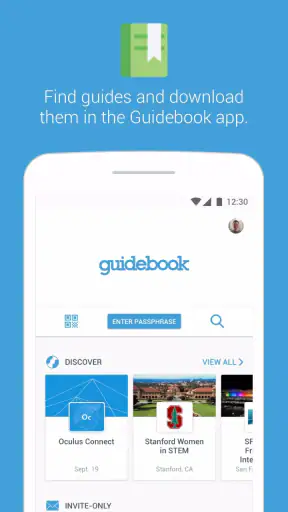
My first useful moment with it was realizing that the app is more valuable when I arrive with a purpose. Opening it without knowing which event or place I wanted to explore felt less rewarding than entering it with a guide in mind. Once I found the relevant guide, the experience became more focused: instead of searching the wider internet for scattered details, I could browse information connected to that particular destination or occasion.
That focused approach is also why the app can make a strong first impression. A dedicated guide is easier to consult while walking around than a long email thread, a printed program, or several browser tabs. If I am attending a conference, for example, I would rather check one organized guide for the day’s details than repeatedly search through messages. If I am visiting a large venue, a guide can provide a more event-centered view than a standard map.
The app’s store summary describes guides to events and places held in one’s hand, and that is a fair description of its role without explaining the whole experience. It is less about discovering every possible destination and more about giving structure to a place or event that already matters to me. That makes the first-week appeal very situational, but also quite practical when the situation is right.
One tip I would give a new user is to look for the guide before the day becomes busy. Installing an app while standing in a crowded entrance, dealing with weak attention, and trying to remember the exact event name is an avoidable annoyance. I would search and open the relevant guide at home, browse its main areas, and make a mental note of where the most important information lives. That small preparation makes the app feel much more useful later.
Where it helps in a real day
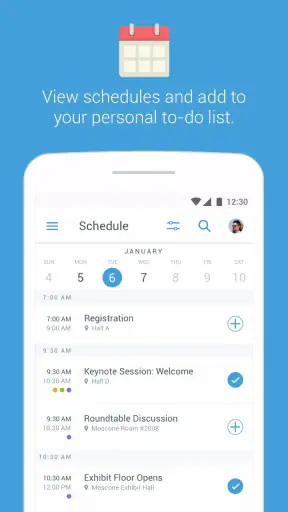
Imagine I am attending a multi-session professional event. I arrive late, do not know the building well, and need to decide whether to attend a session across the venue or stay nearby. A dedicated guide can reduce the number of separate tasks involved: I can consult the event information, check the available options, and keep my attention on the day instead of reconstructing the schedule from memory.
The same pattern works for a visitor exploring a large attraction or a student navigating a campus event. The benefit is not necessarily that the app reveals something astonishing. The benefit is that it presents information in the context where I need it. That context can save time and reduce the mental clutter created by switching between a map, a website, a PDF, and messages from organizers.
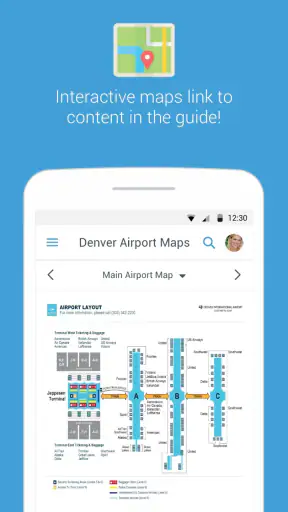
There is a useful trade-off here. A general map is usually better for street-level navigation and spontaneous exploration. Guidebook is more appealing when the destination has its own organized information and I want to understand the event or place as a whole. I would not install it expecting it to replace my everyday navigation app. I would install it because a particular guide may make a specific visit easier.
What makes the novelty wear off
The first-week experience can create an expectation that the app will always have something new to offer. In practice, the usefulness is tied to the guides available to me. Once the event ends, the guide may become something I rarely open. That is not necessarily a flaw; a conference program should not pretend to be a daily social network. Still, it means the app’s early convenience can be temporary.
This is the first important long-term test: does the app have a reason to return after the original visit? For a frequent traveler or someone who attends recurring events, the answer may be yes. For someone who downloads it for one destination and does not often attend organized gatherings, the answer may be no. I would rather be clear about that than recommend keeping every travel utility installed forever.
Month-to-month value depends on your calendar
Guidebook has reached more than a million installs, and its average rating is 3.5 from around four thousand ratings. Those figures suggest a broad audience with mixed experiences rather than universal enthusiasm. I read that as a reminder that the app’s quality is not judged only by its interface. The usefulness of each guide, the relevance of its information, and the timing of a user’s visit all matter.
For me, month-to-month value would come from repeated occasions rather than daily browsing. If I attend several events during a year, visit different organized venues, or regularly need destination-specific information, Guidebook can earn a place in my travel folder. Each new guide gives the app another chance to be useful without requiring me to learn an entirely different service every time.
That recurring value is different from the habit created by a weather app or a navigation app. I would not expect to open Guidebook every morning. Instead, I would return when a trip or event gives me a concrete reason. That can still be a healthy kind of utility: an app does not have to be used daily to be worth keeping, provided it reliably helps during the occasions that matter.
A practical workflow is to treat it as part of trip preparation, not as a permanent source of entertainment. Before leaving, I would install or update it, find the relevant guide, review the sections I am likely to need, and then decide whether it is worth keeping afterward. This keeps the app connected to an actual purpose. It also prevents the common problem of accumulating travel apps that are forgotten immediately after returning home.
Who gets the most from it
I think Guidebook is a good fit for people who attend conferences, festivals, campus programs, organized tours, exhibitions, or large destination-based events. It can also suit travelers who prefer a structured guide over collecting information from many separate pages. The app is especially appealing when the official information for a place is already organized into a guide that I can consult while moving around.
It is less compelling for someone who mainly takes independent city breaks and already relies on a map, a browser, and saved notes. If my trip consists of wandering through neighborhoods, choosing restaurants spontaneously, and checking public transport, a general travel toolkit may serve me better. Guidebook becomes more attractive when the experience has a defined organizer, schedule, venue, or program.
Families may appreciate the simple idea of keeping destination information together, but I would still prepare a backup plan. Travel conditions change, batteries run low, and not every important detail should depend on one app. I would save essential addresses or instructions elsewhere, especially when timing matters. That is not a criticism unique to Guidebook; it is sensible behavior for any travel companion.
The age rating of Everyone is another small advantage. I can recommend it without worrying that the basic app concept is aimed at a narrow adult audience. However, an age rating does not guarantee that every individual event guide will be equally useful for children or families. The suitability of the content still depends on the destination and the event being represented.
Comparing it with familiar alternatives
Compared with a standard map application, Guidebook offers a more curated event or place perspective, while the map usually wins for navigation, business listings, traffic, and broad geographic search. Compared with a browser, Guidebook can feel less scattered because the information is gathered around a particular guide. The browser remains better when I need to compare many independent sources or search for something outside the guide.
Compared with a PDF program, the app is easier to consult on a phone and may feel less cumbersome than zooming through a document. A PDF, however, is often simpler to save, share, or open without learning another interface. Compared with a notes app, Guidebook gives the information a structure I did not have to build myself, while notes are more flexible for personal plans, reminders, and copied addresses.
My choice would therefore depend on the job. I would use Guidebook for organized, destination-specific context; a map for getting there; a browser for broad research; and notes for my own decisions. Expecting one of these tools to replace all the others usually creates frustration. Guidebook earns its place when it fills the middle ground between official event information and practical on-the-go reference.
Maintenance, friction, and the reasons I might remove it
The maintenance burden is fairly easy to understand: the app itself is free, but my attention is still a resource. I need to find the right guide, recognize whether it applies to my visit, and remember to check it at the useful moments. If I download it without a specific destination in mind, it can quickly become another unused icon.
I would also avoid assuming that opening the app guarantees a complete travel plan. A guide may organize the information connected to an event, but I still need to think about transport, timing, reservations, weather, accessibility, and backup options. Guidebook can reduce information juggling; it cannot remove the planning decisions around a trip.
One non-obvious trade-off is the difference between centralized information and personal control. A dedicated guide is convenient because someone else has arranged the material. That same arrangement may not match the way I plan. I may care most about quiet areas, child-friendly stops, or a particular route, while the guide emphasizes the organizer’s priorities. In those cases, I would use it as a reference and keep my own notes alongside it.
Another source of fatigue is repetition. If I attend similar events often, I may appreciate the familiar format at first, but I may also start checking the same kinds of information again and again. When the app does not add much beyond what I already know, a saved webpage or simple note can be quicker. The best workflow is to use the guide for discovery and orientation, then rely on the lightest tool that handles the remaining details.
There is also a psychological burden in having too many event-specific tools. Every additional app asks me to remember where information lives. Guidebook reduces that burden when several useful details are in one guide, but it can increase it if I install it alongside a separate organizer app, venue app, ticket app, and map for the same occasion. Before downloading, I would check whether the event already has an official digital system that covers the same ground more directly.
Questions I would answer before installing
If I were wondering whether it works without paying, the answer is straightforward: Guidebook is free. That makes trying it for one event relatively low-risk. I would still judge it by the quality and relevance of the guide connected to my visit, rather than by the absence of a download cost.
If I were asking whether it is suitable for an older phone, the listed minimum is Android 6.0. That covers many older devices, although real comfort will still depend on the phone’s condition and available space. I would update the app before traveling rather than waiting until I am already at the venue.
If I were unsure whether to keep it installed permanently, I would use a simple rule: keep it if I have another event or destination likely to benefit from it soon; remove it if the original guide was a one-time need and I already saved the information I care about. Reinstalling a free travel utility when the next occasion arrives is often more sensible than maintaining a crowded app drawer.
If I were choosing between Guidebook and a normal travel app, I would ask whether my trip is organized around a specific event or place. If yes, I would try Guidebook first. If no, I would probably begin with a map and browser because they are more versatile for open-ended exploration.
Finally, if I were concerned about relying on it during a busy day, I would prepare before leaving, identify the guide I need, and keep critical information available through another method. That approach gives me the convenience of a central guide without turning it into my only source of truth.
My long-term verdict after the novelty fades
Guidebook earns lasting space for the right kind of traveler, not for everyone. I like its event-and-place focus, its free entry point, and the way a dedicated guide can replace a messy collection of programs, pages, and messages. The app feels most worthwhile when I have a clear destination and need organized information while I am there.
Its weakness is equally clear: the reason to return is occasional rather than universal. Someone who attends organized events regularly may find recurring value, while an independent traveler with a strong map-and-notes routine may see little benefit after the first use. The mixed average rating also fits my overall impression: the concept is useful, but the experience depends heavily on whether the available guide matches the user’s immediate needs.
Guidebook has been developed by Guidebook Inc and remains a practical option for people who want event and destination information gathered in one mobile place. I would recommend it to a friend before a conference, festival, campus visit, or similarly structured trip. I would not recommend installing it simply because it is a travel app. Its lasting value comes from repeated relevant situations, and when those situations are part of your life, the app can quietly become a dependable travel companion rather than a novelty.


